
Choose a real pickup point
Search an address, tap a location on the map or use your current position. Add the exact destination before reviewing the route.
Download the Taxi.com.cy Passenger / Client Android beta app for booking a taxi in Cyprus. Choose your pickup, review the journey and follow the trip, starting with our Limassol network.
Requests through this site, not completed installations. How the counter works.
Search an address, tap a location on the map or use your current position. Add the exact destination before reviewing the route.
Check the service, vehicle choice, estimated distance and fare before submitting. A metered estimate is not a fixed final fare.
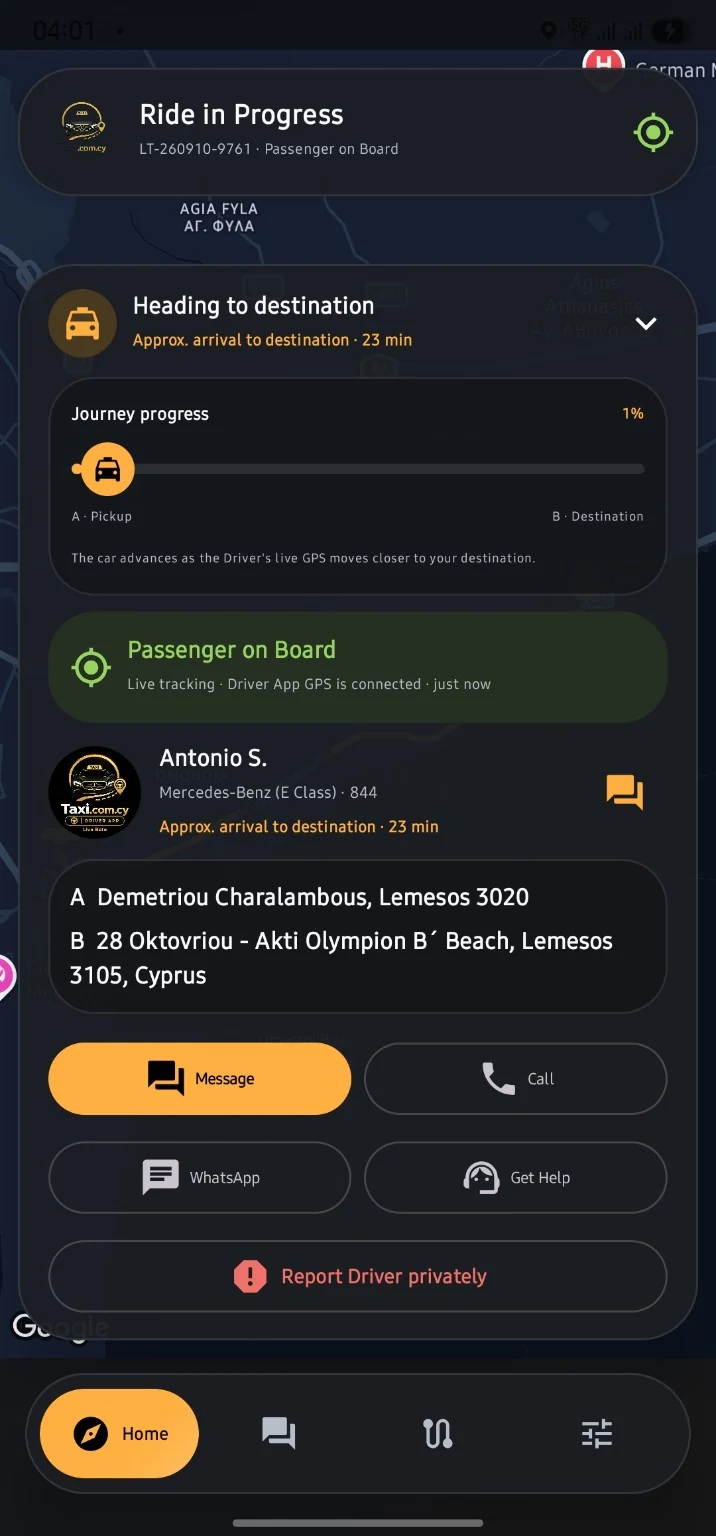
See booking stages and driver information after assignment. Follow progress while the driver app is connected and sharing location.
Open upcoming bookings and ride history, use the available contact options and leave feedback after the journey.
Explore the Passenger / Client tools in the Taxi.com.cy platform, from the everyday essentials to configurable account tools and newer beta enhancements.
58 features across 9 categories
Operator setting means the feature must be enabled for your account or network. Build-dependent means a newer enhancement or rollout item: check your installed beta before relying on it. This directory is not a claim that every item is active in every APK.
Request a journey now or choose a future date and time.
Book a taxi; additional delivery services appear only when enabled by your operator.
Choose from the Economy, Business and Super Fast options enabled for your area.
Review 4-seater sedans and, in eligible classes, 7-seater minivans. Economy does not include the 7-seater option.
Check the vehicle capacity and luggage allowance before choosing your ride.
Review your route, ride class, timing, contact details and booking policies in one place.
Your booking is created only after you select a payment method and tap Book Now.
Search for both your pickup address and destination.
Set your pickup from your current position after granting location permission.
Choose the exact pickup or destination point rather than relying only on a typed address.
Pan and zoom to inspect your journey and the surrounding area.
See pickup and destination markers joined by the planned route.
Review the estimated route distance, journey time and arrival time before booking.
Keep frequently used addresses in the account tools when this feature is enabled.
Follow the search for an eligible driver and see your request details.
After assignment, view the driver profile, vehicle details and booking reference.
Follow Taxi on the Way, Driver Arrived, Passenger on Board and Trip Complete.
See location updates while the Driver app has a connection and the necessary GPS permissions.
Follow the route progress indicator as the driver approaches your destination.
See approximate arrival information; traffic, routing and GPS freshness can change the estimate.
Receive supported ride updates in the app and through enabled device notifications.
See an estimate before booking, with a clear explanation that the final metered fare can differ.
Choose cash when it is available for the selected booking.
Use the card or online payment options enabled by your operator; availability is shown at checkout.
View your current account balance and the payment methods available to you.
Open the available wallet top-up flow from your account settings.
An unavailable wallet payment is clearly marked so you can fund the wallet or choose another method.
Review available payment details and completed-trip receipts in your account.
Keep scheduled rides and completed journeys in separate lists.
See a map of the pickup and destination alongside the booking.
Review the reference, date, service, class, driver, vehicle and displayed fare.
Start a new scheduled booking directly from Ride History.
See the applicable free-cancellation window and any later fee before deciding to cancel.
Expanded fare, payment and rating boxes depend on the history-screen revision installed.
Message your assigned driver through the booking conversation.
Use the available call action during your journey.
Open the WhatsApp contact option when it is available for the booking.
Find the operator support options without losing the context of your booking.
Use the private report action for a concern about the assigned driver; this is not an emergency service.
Support availability indicators and problem attachments depend on the enabled support release.
Rate the driver and the overall journey independently.
Add a comment to explain your experience.
Dismiss the rating prompt with Maybe later rather than interrupting your next action.
Keep booking messages and supported account notices together.
Mark inbox notifications as read where the updated inbox controls are enabled.
Manage the account information used for your bookings.
Use your account photo; cross-device photo synchronisation depends on the profile update installed.
Submit requested verification details and view your account status when verification is required.
Use the supported sign-in and forgotten-password tools.
Use a passkey only on supported devices with the required account and server configuration.
Review the account payment methods enabled by your operator.
Use the account sharing or invitation option when enabled; no reward is implied.
Choose the appearance options permitted by your operator.
Use permitted theme, interface-size, spacing and curved-layout preferences.
Manage supported alerts and review the device permissions used by the app.
Open the applicable terms and privacy information from the account tools.
View app information; expanded version, server hostname, sync and system-status diagnostics depend on the About-screen update.
Use Limassol.Taxi.com.cy for browser-based booking when an app is not installed.
No matching features. Try a broader term or clear the search.
Connected to Limassol.Taxi.com.cy. Booking status, account permissions, available drivers and payment choices come from the connected operating network. GPS, notification, Maps and Android background permissions can affect live features. iOS is coming soon.
Download the Passenger / Client app and sign in or register using the options offered by Taxi.com.cy.
Shared totals start when the counter is activated.
These are Android download requests through this website, not verified completed downloads, installations or unique users. Quick repeat clicks are filtered. Earlier downloads and direct links used elsewhere are not included.
Yes. Use Download Android beta to get the official Passenger / Client APK hosted on Limassol.Taxi.com.cy. Sign in or register using the options offered in the beta.
The iOS Passenger app is coming soon. This page does not claim an App Store release. Online taxi booking remains available in your iPhone browser.
Limassol is the first live city network. City-to-city requests and local app rollout are different: check the Cyprus coverage guide before planning a journey elsewhere.
Review the available payment method, fare explanation and cancellation terms in the actual booking flow. Do not use screenshot prices as a quote. Read the booking terms before submitting.